Appointments book themselves
and you get your time back
Customers book, move and cancel appointments 24/7 on your business page, with automatic reminders, a tidy calendar and a waitlist. No calls, no messages.
Customers book, move and cancel appointments 24/7 on your business page, with automatic reminders, a tidy calendar and a waitlist. No calls, no messages.


Everything your business needs,
in one app
From booking to reminder, OverTor handles the day-to-day for you, so you have time to do your work.



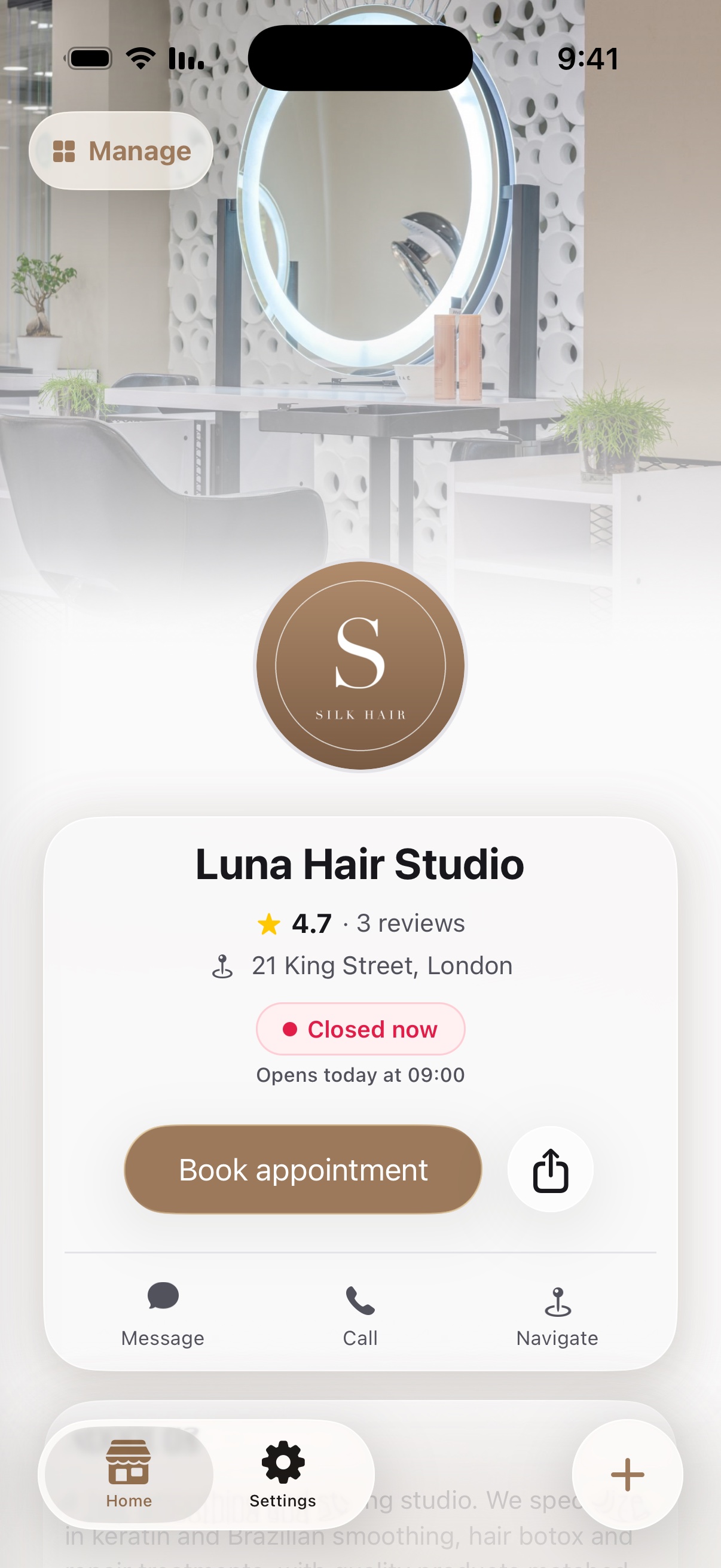
A branded business page
Logo, work gallery, services and prices. Everything customers need to see before they book.
A branded business page
Logo, work gallery, services and prices. Everything customers need to see before they book.
A branded business page
Logo, work gallery, services and prices. Everything customers need to see before they book.






Your customers in one place
Every customer and their history, with an attendance policy that flags no-shows and late arrivals.
Your customers in one place
Every customer and their history, with an attendance policy that flags no-shows and late arrivals.
Your customers in one place
Every customer and their history, with an attendance policy that flags no-shows and late arrivals.
Noa
8 appointments today

Maya
7 appointments today

Shira
5 appointments today

Dana
3 appointments today

Staff and working hours
A separate calendar for each staff member, regular shifts, and closures for holidays and time off.
Noa
8 appointments today
Maya
7 appointments today
Shira
5 appointments today
Dana
3 appointments today
Staff and working hours
A separate calendar for each staff member, regular shifts, and closures for holidays and time off.
Noa
8 appointments today
Maya
7 appointments today
Shira
5 appointments today
Dana
3 appointments today
Staff and working hours
A separate calendar for each staff member, regular shifts, and closures for holidays and time off.
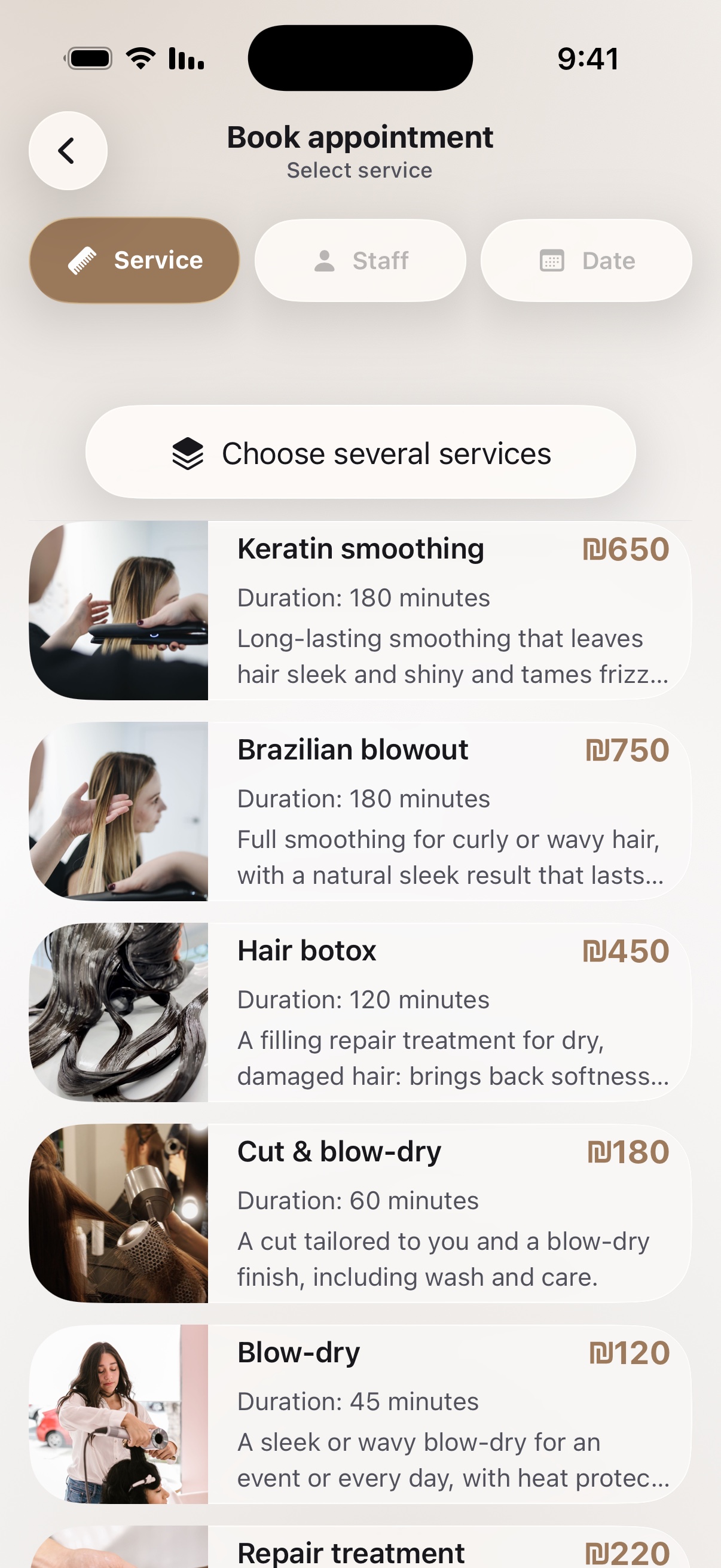

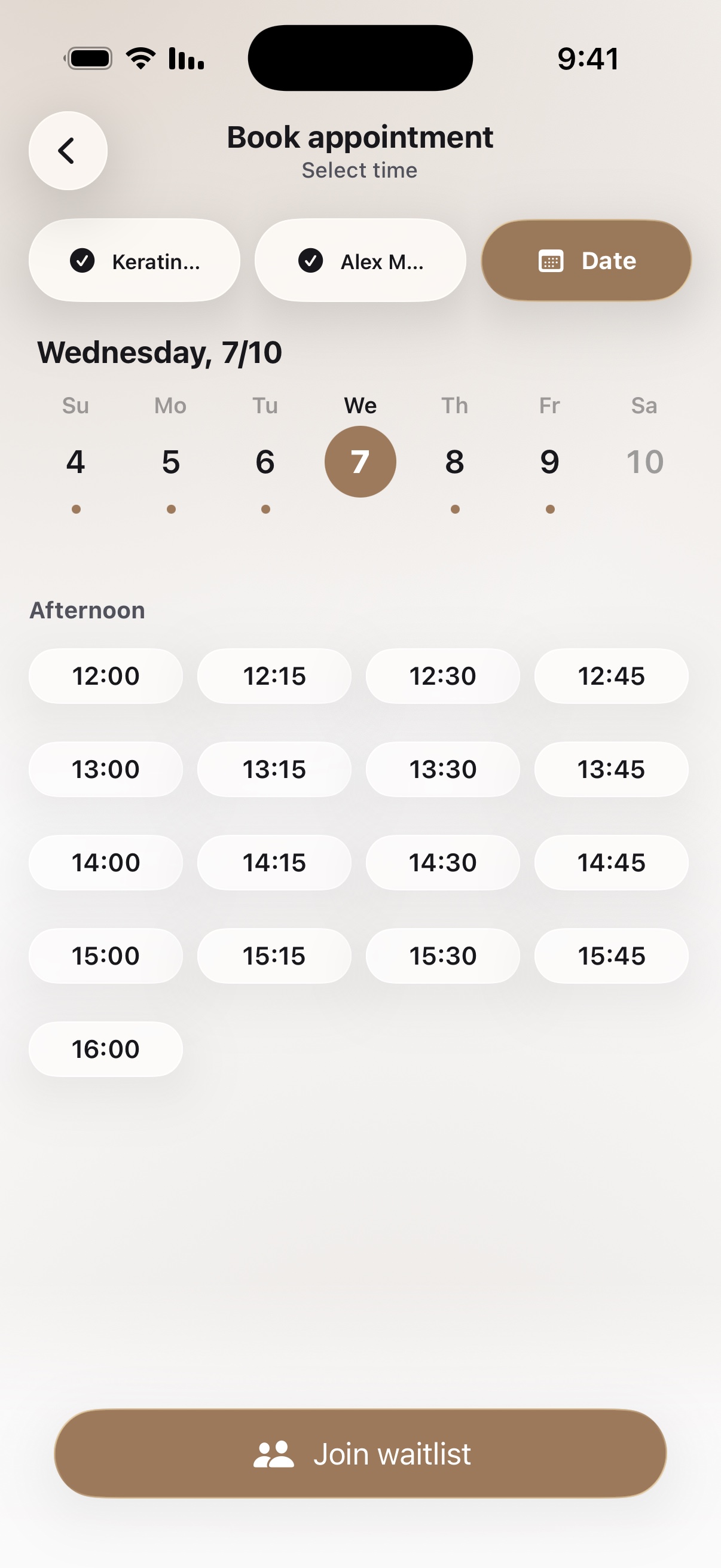
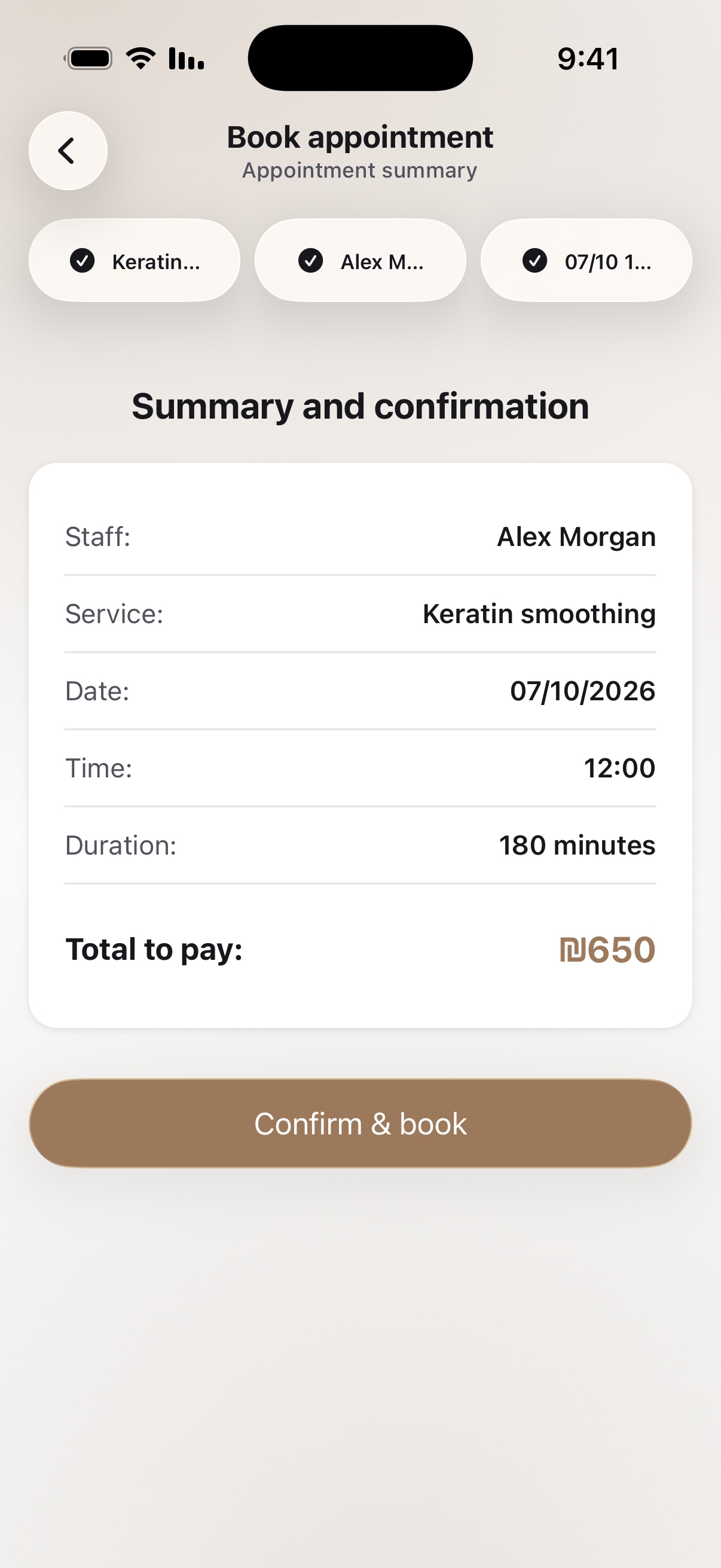
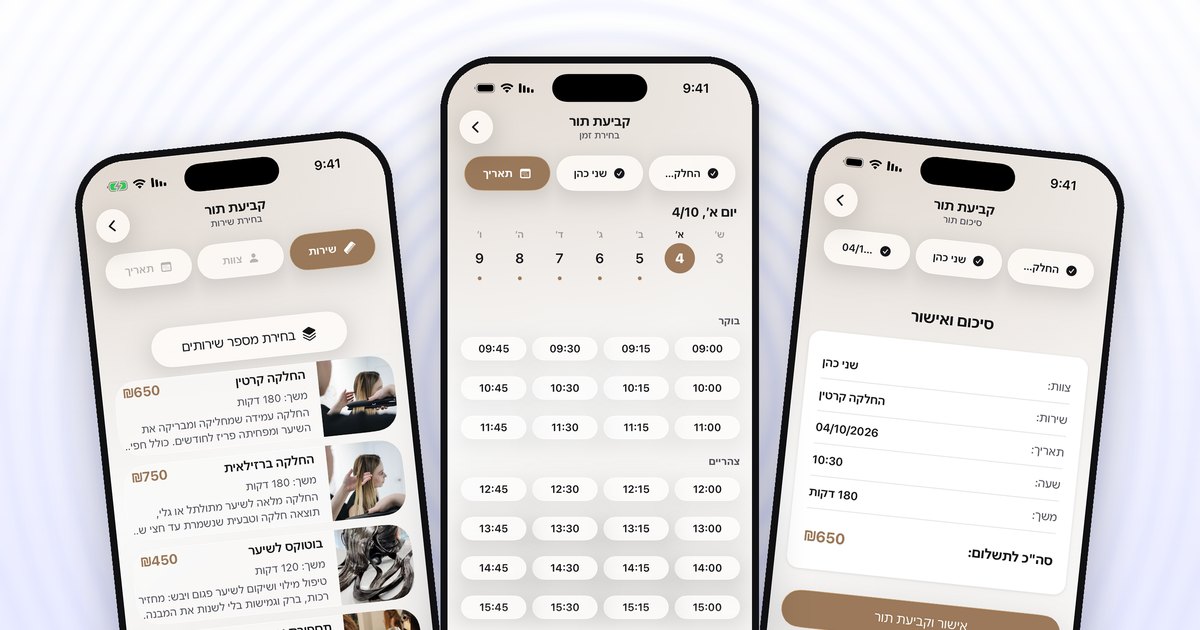
Booking in 3 steps
Service, time, confirm. Customers book on their own from anywhere, 24/7, and all that's left is to watch the calendar fill up.
Booking in 3 steps
Service, time, confirm. Customers book on their own from anywhere, 24/7, and all that's left is to watch the calendar fill up.
Booking in 3 steps
Service, time, confirm. Customers book on their own from anywhere, 24/7, and all that's left is to watch the calendar fill up.


Waitlist and gradual opening
A freed-up slot goes automatically to the next in line, and the calendar opens gradually as it fills.
Waitlist and gradual opening
A freed-up slot goes automatically to the next in line, and the calendar opens gradually as it fills.
Waitlist and gradual opening
A freed-up slot goes automatically to the next in line, and the calendar opens gradually as it fills.



Automatic reminders
A reminder before every appointment, without sending a single message. Fewer customers who forget to show up.
Automatic reminders
A reminder before every appointment, without sending a single message. Fewer customers who forget to show up.
Automatic reminders
A reminder before every appointment, without sending a single message. Fewer customers who forget to show up.
Hear it from our users
"Bloom has transformed the way I think about my life. Highly recommend!"
Makayla Johnson


"Bloom has completely transformed my daily routine. The guided meditations are exactly what I need to start my mornings with clarity and focus."
Christina Matthews

"I've tried many meditation apps, but Bloom stands out with its personalized programs and calming design. It feels like it was made just for me."
Sofia Marquez
The community feature makes me feel less isolated and motivated"
Stephanie Jackson


"The soft visuals and calming sounds instantly put me in the right mindset. Bloom is more than an app—it’s a daily ritual for me now."
Samantha Vier

"As someone with a busy schedule, I appreciate how Bloom makes it easy to fit meditation into my day. Just a few minutes and I feel more centered."
Anna McDaniels
"Bloom has transformed the way I think about my life. Highly recommend!"
Makayla Johnson
"Bloom has completely transformed my daily routine. The guided meditations are exactly what I need to start my mornings with clarity and focus."
Christina Matthews
"I've tried many meditation apps, but Bloom stands out with its personalized programs and calming design. It feels like it was made just for me."
Sofia Marquez
The community feature makes me feel less isolated and motivated"
Stephanie Jackson
"The soft visuals and calming sounds instantly put me in the right mindset. Bloom is more than an app—it’s a daily ritual for me now."
Samantha Vier
"As someone with a busy schedule, I appreciate how Bloom makes it easy to fit meditation into my day. Just a few minutes and I feel more centered."
Anna McDaniels
"Bloom has transformed the way I think about my life. Highly recommend!"
Makayla Johnson
"Bloom has completely transformed my daily routine. The guided meditations are exactly what I need to start my mornings with clarity and focus."
Christina Matthews
"I've tried many meditation apps, but Bloom stands out with its personalized programs and calming design. It feels like it was made just for me."
Sofia Marquez
The community feature makes me feel less isolated and motivated"
Stephanie Jackson
"The soft visuals and calming sounds instantly put me in the right mindset. Bloom is more than an app—it’s a daily ritual for me now."
Samantha Vier
"As someone with a busy schedule, I appreciate how Bloom makes it easy to fit meditation into my day. Just a few minutes and I feel more centered."
Anna McDaniels
"Bloom has transformed the way I think about my life. Highly recommend!"
Makayla Johnson
"Bloom has completely transformed my daily routine. The guided meditations are exactly what I need to start my mornings with clarity and focus."
Christina Matthews
"I've tried many meditation apps, but Bloom stands out with its personalized programs and calming design. It feels like it was made just for me."
Sofia Marquez
The community feature makes me feel less isolated and motivated"
Stephanie Jackson
"The soft visuals and calming sounds instantly put me in the right mindset. Bloom is more than an app—it’s a daily ritual for me now."
Samantha Vier
"As someone with a busy schedule, I appreciate how Bloom makes it easy to fit meditation into my day. Just a few minutes and I feel more centered."
Anna McDaniels
"Bloom has transformed the way I think about my life. Highly recommend!"
Makayla Johnson
"Bloom has completely transformed my daily routine. The guided meditations are exactly what I need to start my mornings with clarity and focus."
Christina Matthews
"I've tried many meditation apps, but Bloom stands out with its personalized programs and calming design. It feels like it was made just for me."
Sofia Marquez
The community feature makes me feel less isolated and motivated"
Stephanie Jackson
"The soft visuals and calming sounds instantly put me in the right mindset. Bloom is more than an app—it’s a daily ritual for me now."
Samantha Vier
"As someone with a busy schedule, I appreciate how Bloom makes it easy to fit meditation into my day. Just a few minutes and I feel more centered."
Anna McDaniels
"Bloom has transformed the way I think about my life. Highly recommend!"
Makayla Johnson
"Bloom has completely transformed my daily routine. The guided meditations are exactly what I need to start my mornings with clarity and focus."
Christina Matthews
"I've tried many meditation apps, but Bloom stands out with its personalized programs and calming design. It feels like it was made just for me."
Sofia Marquez
The community feature makes me feel less isolated and motivated"
Stephanie Jackson
"The soft visuals and calming sounds instantly put me in the right mindset. Bloom is more than an app—it’s a daily ritual for me now."
Samantha Vier
"As someone with a busy schedule, I appreciate how Bloom makes it easy to fit meditation into my day. Just a few minutes and I feel more centered."
Anna McDaniels
"Bloom has transformed the way I think about my life. Highly recommend!"
Makayla Johnson
"Bloom has completely transformed my daily routine. The guided meditations are exactly what I need to start my mornings with clarity and focus."
Christina Matthews
"I've tried many meditation apps, but Bloom stands out with its personalized programs and calming design. It feels like it was made just for me."
Sofia Marquez
The community feature makes me feel less isolated and motivated"
Stephanie Jackson
"The soft visuals and calming sounds instantly put me in the right mindset. Bloom is more than an app—it’s a daily ritual for me now."
Samantha Vier
"As someone with a busy schedule, I appreciate how Bloom makes it easy to fit meditation into my day. Just a few minutes and I feel more centered."
Anna McDaniels
"Bloom has transformed the way I think about my life. Highly recommend!"
Makayla Johnson
"Bloom has completely transformed my daily routine. The guided meditations are exactly what I need to start my mornings with clarity and focus."
Christina Matthews
"I've tried many meditation apps, but Bloom stands out with its personalized programs and calming design. It feels like it was made just for me."
Sofia Marquez
The community feature makes me feel less isolated and motivated"
Stephanie Jackson
"The soft visuals and calming sounds instantly put me in the right mindset. Bloom is more than an app—it’s a daily ritual for me now."
Samantha Vier
"As someone with a busy schedule, I appreciate how Bloom makes it easy to fit meditation into my day. Just a few minutes and I feel more centered."
Anna McDaniels
"Bloom has transformed the way I think about my life. Highly recommend!"
Makayla Johnson
"Bloom has completely transformed my daily routine. The guided meditations are exactly what I need to start my mornings with clarity and focus."
Christina Matthews
"I've tried many meditation apps, but Bloom stands out with its personalized programs and calming design. It feels like it was made just for me."
Sofia Marquez
The community feature makes me feel less isolated and motivated"
Stephanie Jackson
"The soft visuals and calming sounds instantly put me in the right mindset. Bloom is more than an app—it’s a daily ritual for me now."
Samantha Vier
"As someone with a busy schedule, I appreciate how Bloom makes it easy to fit meditation into my day. Just a few minutes and I feel more centered."
Anna McDaniels
"Bloom has transformed the way I think about my life. Highly recommend!"
Makayla Johnson
"Bloom has completely transformed my daily routine. The guided meditations are exactly what I need to start my mornings with clarity and focus."
Christina Matthews
"I've tried many meditation apps, but Bloom stands out with its personalized programs and calming design. It feels like it was made just for me."
Sofia Marquez
The community feature makes me feel less isolated and motivated"
Stephanie Jackson
"The soft visuals and calming sounds instantly put me in the right mindset. Bloom is more than an app—it’s a daily ritual for me now."
Samantha Vier
"As someone with a busy schedule, I appreciate how Bloom makes it easy to fit meditation into my day. Just a few minutes and I feel more centered."
Anna McDaniels
"Bloom has transformed the way I think about my life. Highly recommend!"
Makayla Johnson
"Bloom has completely transformed my daily routine. The guided meditations are exactly what I need to start my mornings with clarity and focus."
Christina Matthews
"I've tried many meditation apps, but Bloom stands out with its personalized programs and calming design. It feels like it was made just for me."
Sofia Marquez
The community feature makes me feel less isolated and motivated"
Stephanie Jackson
"The soft visuals and calming sounds instantly put me in the right mindset. Bloom is more than an app—it’s a daily ritual for me now."
Samantha Vier
"As someone with a busy schedule, I appreciate how Bloom makes it easy to fit meditation into my day. Just a few minutes and I feel more centered."
Anna McDaniels
"Bloom has transformed the way I think about my life. Highly recommend!"
Makayla Johnson
"Bloom has completely transformed my daily routine. The guided meditations are exactly what I need to start my mornings with clarity and focus."
Christina Matthews
"I've tried many meditation apps, but Bloom stands out with its personalized programs and calming design. It feels like it was made just for me."
Sofia Marquez
The community feature makes me feel less isolated and motivated"
Stephanie Jackson
"The soft visuals and calming sounds instantly put me in the right mindset. Bloom is more than an app—it’s a daily ritual for me now."
Samantha Vier
"As someone with a busy schedule, I appreciate how Bloom makes it easy to fit meditation into my day. Just a few minutes and I feel more centered."
Anna McDaniels
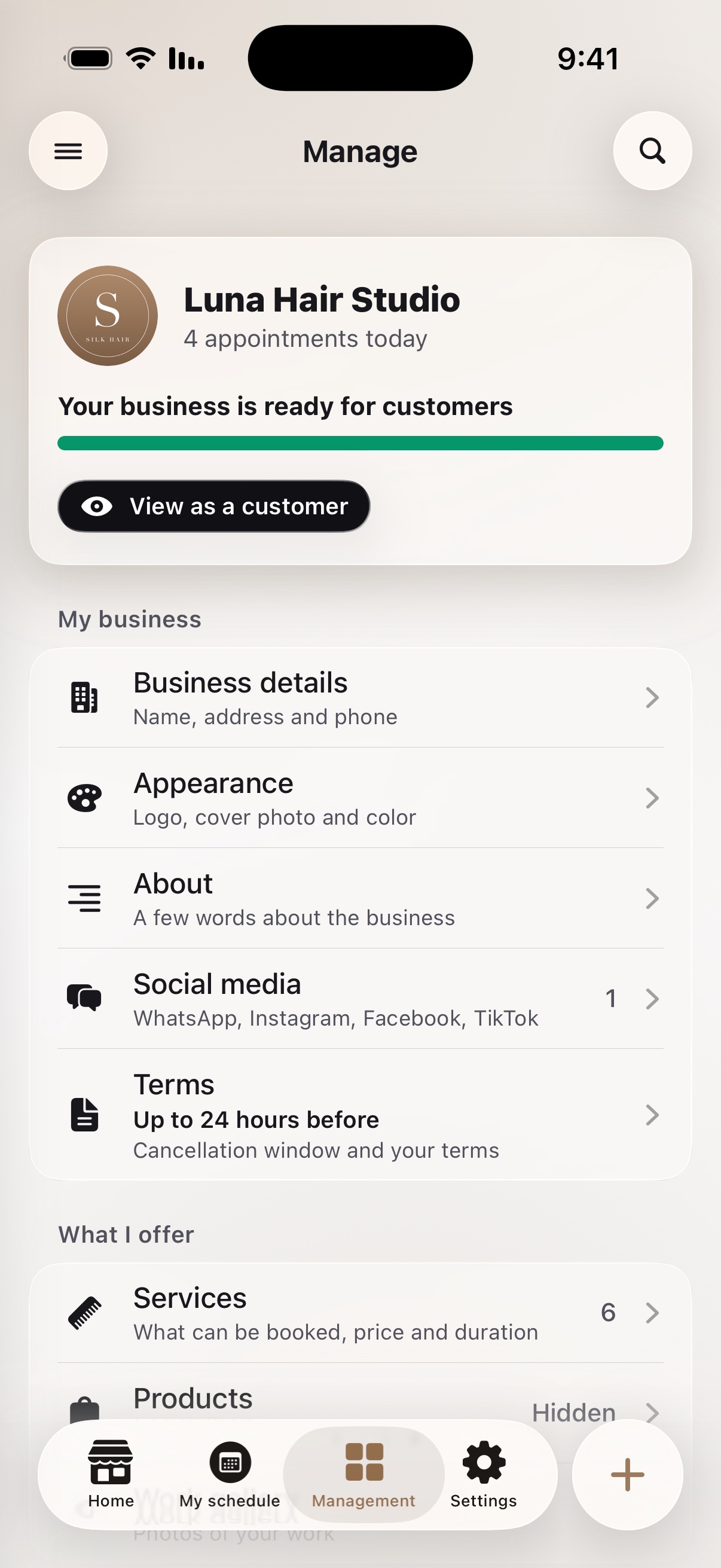
How it works
Three short steps, and your business starts taking appointments in the app.
Set up your business
Download the app and set up your business in a few minutes: name, logo, cover photo and brand color.
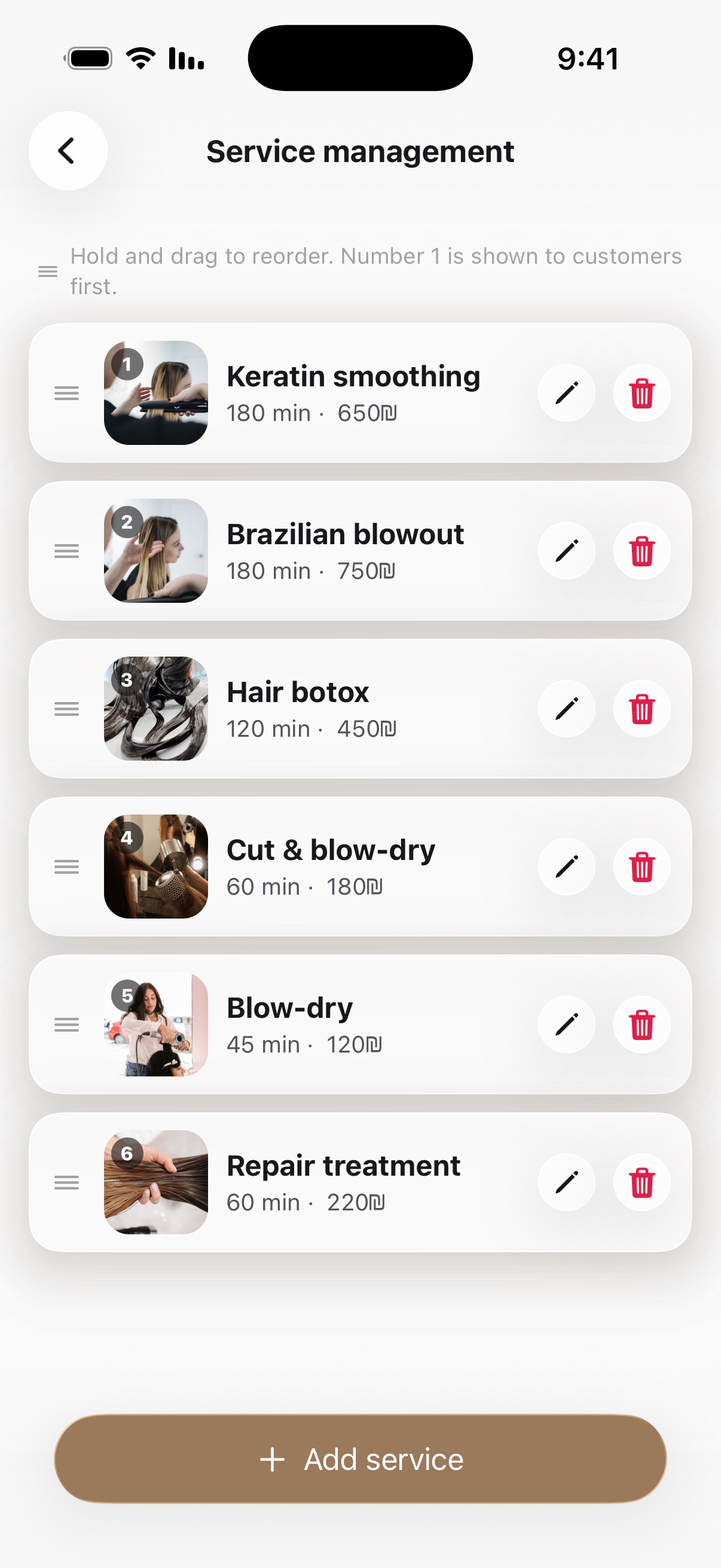
Add services and hours
Add services with a price and duration for each, staff members and opening hours. Your calendar is ready.
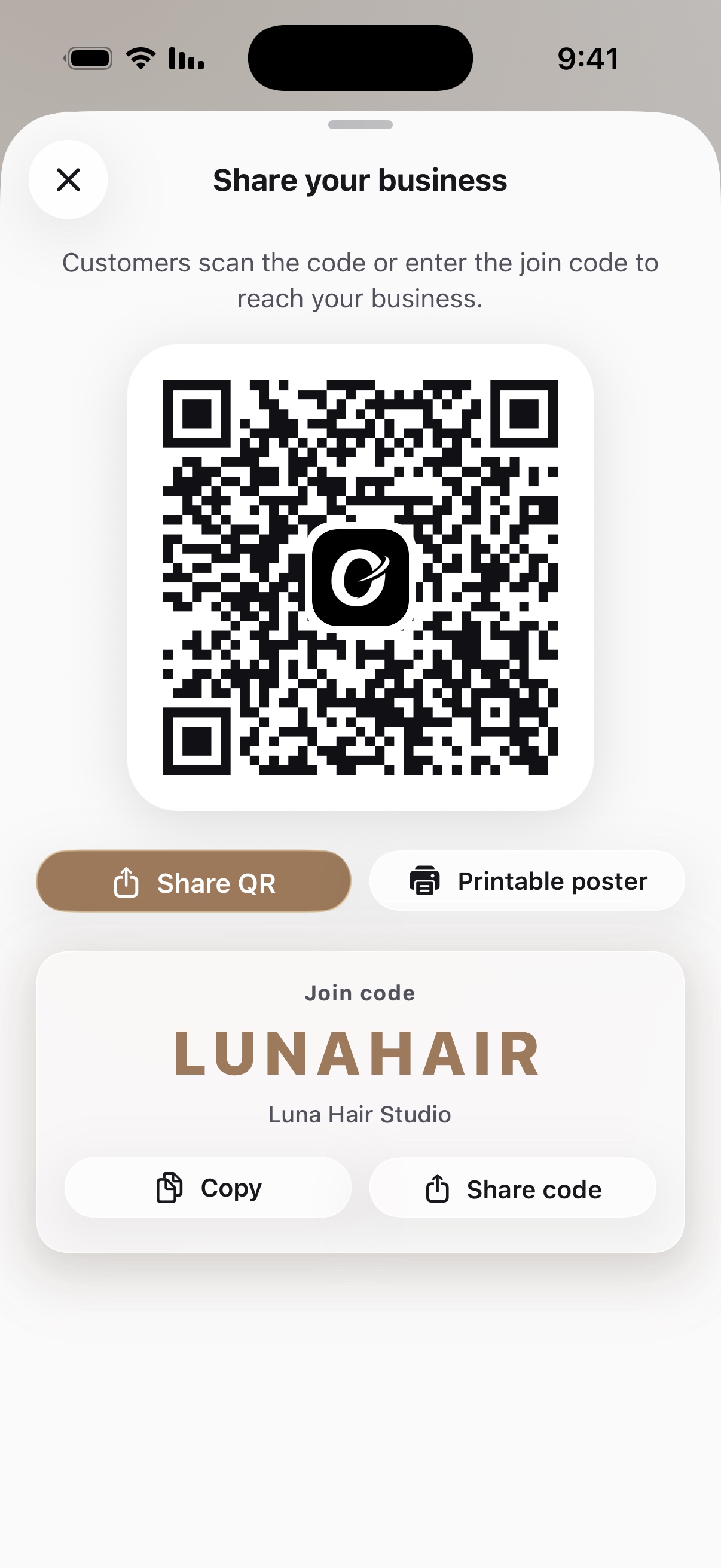
Share and get booked
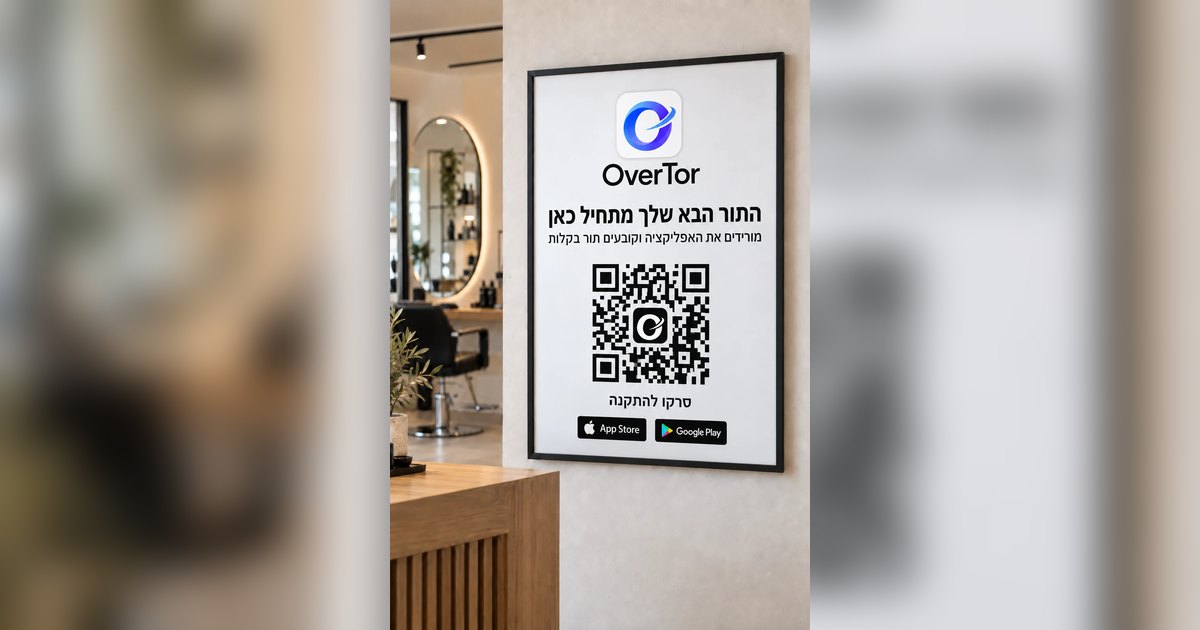
Send customers a link or put up a QR code at your business. From there they book on their own, and reminders go out automatically.
Set up your business
Download the app and set up your business in a few minutes: name, logo, cover photo and brand color.
Add services and hours
Add services with a price and duration for each, staff members and opening hours. Your calendar is ready.
Share and get booked
Send customers a link or put up a QR code at your business. From there they book on their own, and reminders go out automatically.
Set up your business
Download the app and set up your business in a few minutes: name, logo, cover photo and brand color.
Add services and hours
Add services with a price and duration for each, staff members and opening hours. Your calendar is ready.
Share and get booked
Send customers a link or put up a QR code at your business. From there they book on their own, and reminders go out automatically.
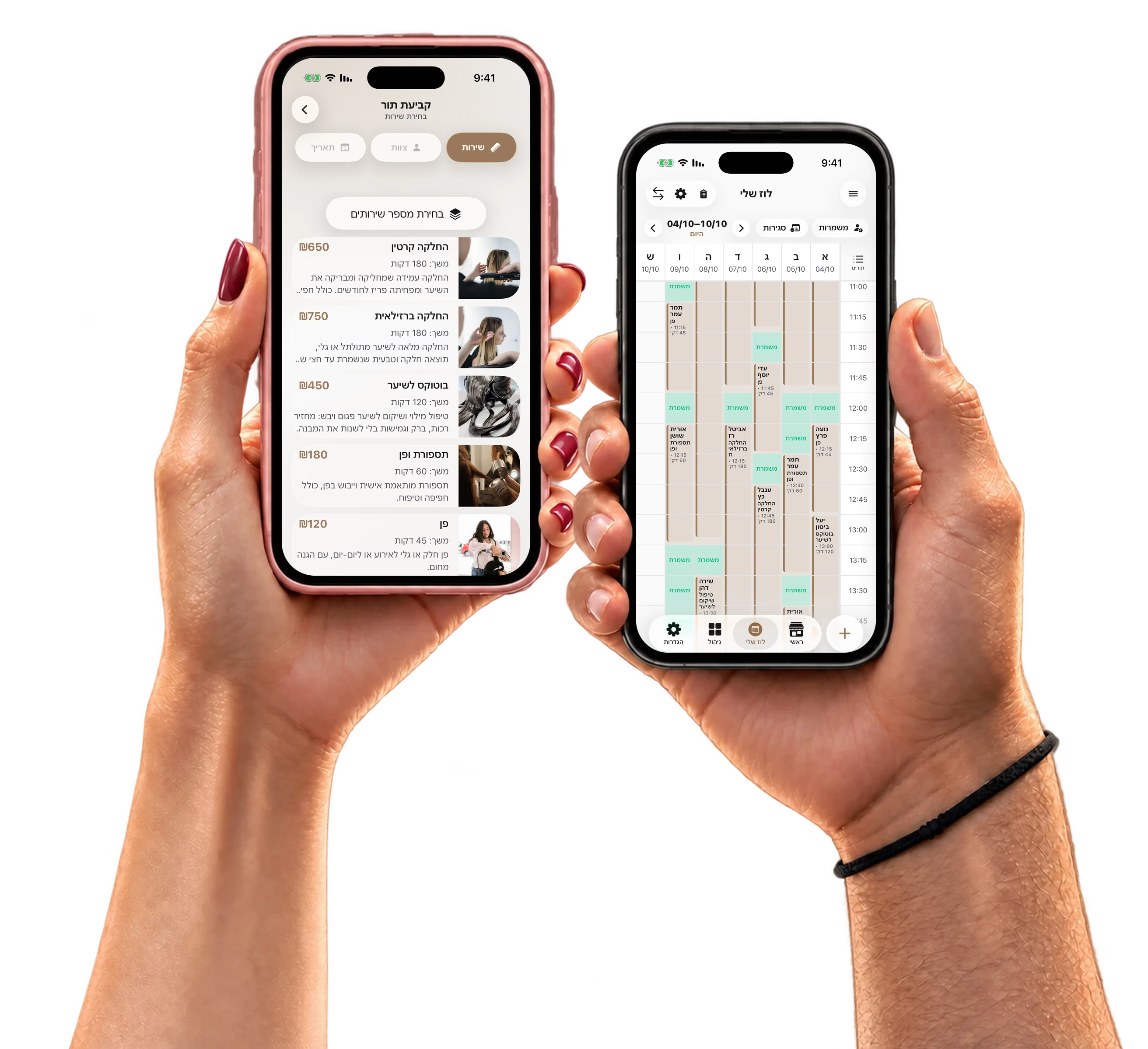
Your whole business on one screen
A full weekly calendar on a big screen: see the whole staff, book and move appointments by dragging, and manage shifts, breaks and holidays. Nothing to install, right from the browser.
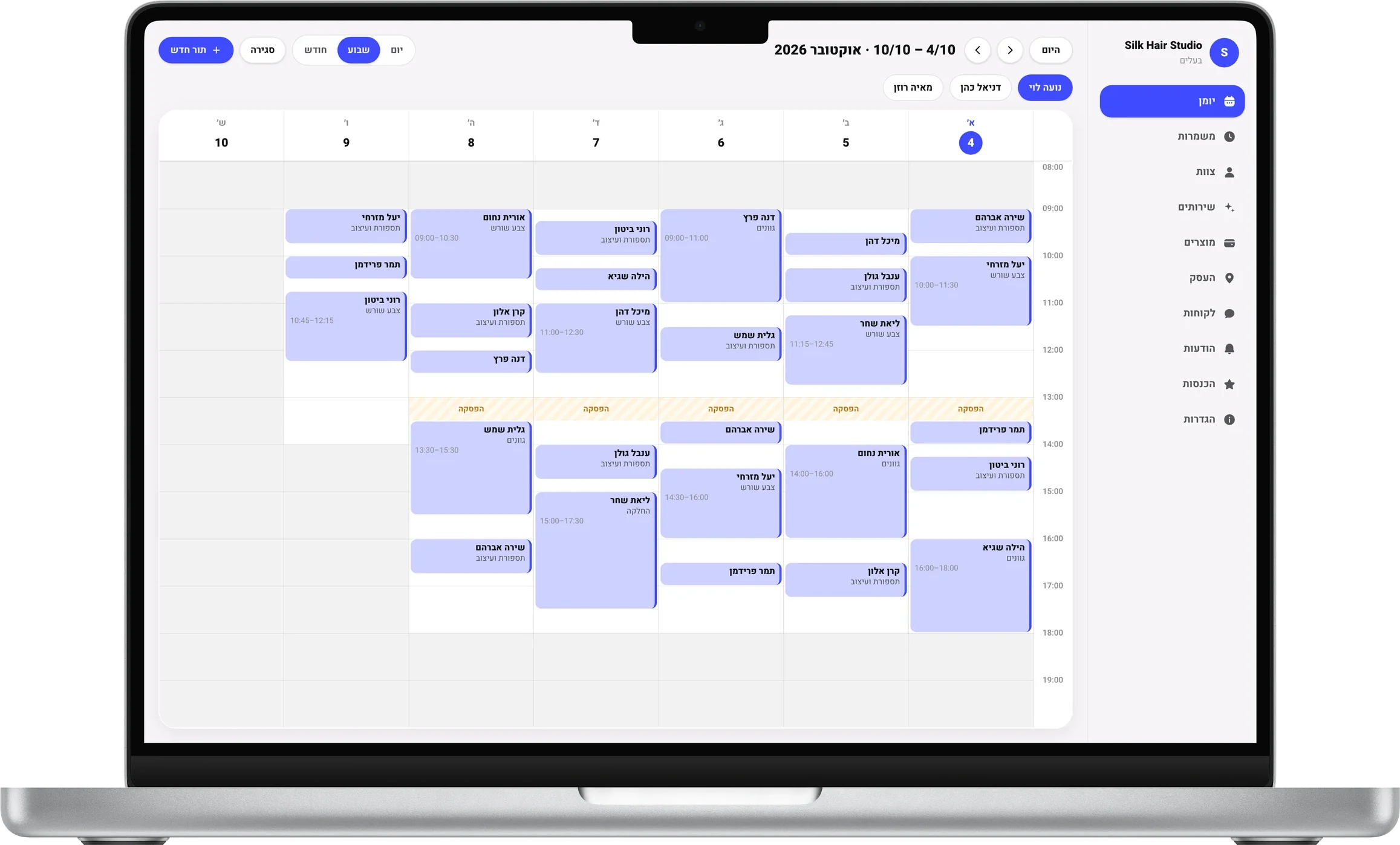
Drag, and it moves
Drag an appointment to another day or time, and the customer gets an update.
Shifts and breaks
A work week for each staff member, and the calendar warns you when you book outside their hours.
Holidays and closures
Jewish holidays are synced to the calendar, with your own closing time for each holiday eve.
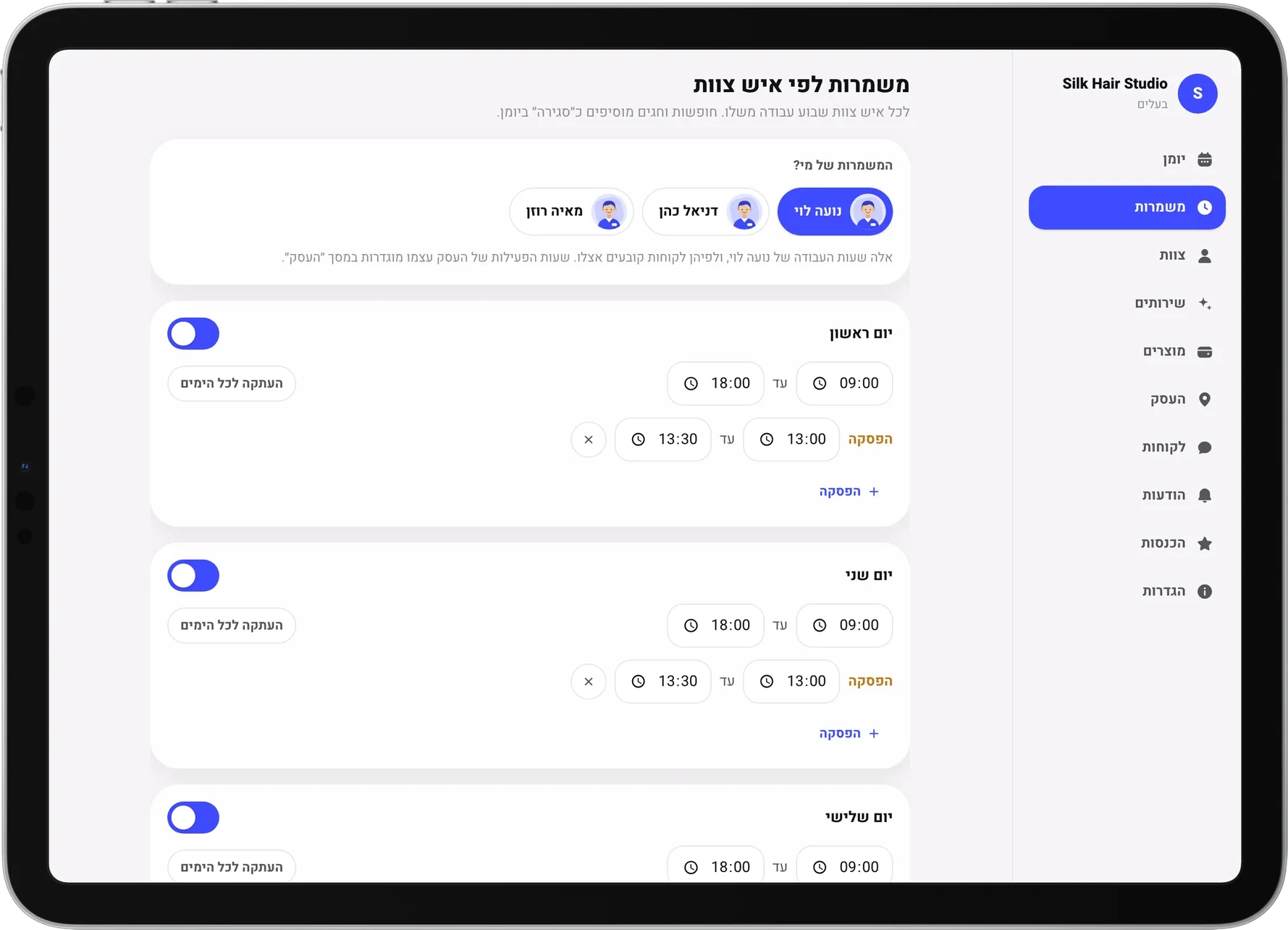
On your phone, tablet or computer
Everything your business does in the app is also available in the browser, synced in real time across all your devices.
- Services and pricesAdd, edit and arrange what customers see.
- Staff and shiftsWorking hours, breaks and time off for each staff member.
- Customers and waitlistAppointment history, attendance and reviews in one place.
- Messages and remindersAutomatic reminders, and a message to all customers in one tap.
- Business page, QR code and posterOne link to share, and a print-ready poster for your business.
FAQ
Didn't find an answer? Write to us with any question.
Can I start for free?
Do customers need to download an app?
How long does it take to get started?
Can I manage several staff members?
What happens when a customer cancels an appointment?
How do I cancel the subscription?
How do I contact you?
Can I start for free?
Do customers need to download an app?
How long does it take to get started?
Can I manage several staff members?
What happens when a customer cancels an appointment?
How do I cancel the subscription?
How do I contact you?
Can I start for free?
Do customers need to download an app?
How long does it take to get started?
Can I manage several staff members?
What happens when a customer cancels an appointment?
How do I cancel the subscription?
How do I contact you?
Start taking appointments today
Download OverTor, set up your business and start with a free trial.



Start taking appointments today
Download OverTor, set up your business and start with a free trial.
Start taking appointments today
Download OverTor, set up your business and start with a free trial.
From the blog
Practical guides for businesses that work by appointment: how to fill the calendar, cut cancellations and save hours on the phone.