 OverTor
Managing staff and shifts in an appointment-based business
Managing staff and shifts in a barbershop, beauty salon or clinic: a separate calendar for each staff member, services per person, regular shifts, time off and holidays, and letting customers choose who they book with.

When a business grows from one person to several staff members, the calendar suddenly becomes much more complicated. Who is working today? Who can do a straightening treatment and who only does haircuts? What happens when a therapist takes time off, and how does a regular customer find an opening with the barber they are used to? Good staff and shift management answers these questions in advance, so customers book on their own and the owner doesn't have to act as a switchboard. This article goes through the basics: separate calendars, assigning services, regular shifts, closures, choosing a staff member, and how to keep the overall picture.
A separate calendar for each staff member
The common mistake in growing businesses is to keep working with one shared calendar. It works with two people, but very soon you get double bookings, times that look available but aren't, and confusion over who is seeing whom.
A separate calendar for each staff member means that:
- Each person's availability is shown separately, according to their own hours and services.
- Two customers can book the same time, each with a different staff member, with no clash.
- Each staff member sees their own day, without getting lost in other people's appointments.
In OverTor you can add unlimited staff members, and each one has their own calendar, their own services and their own regular shifts.
Which services each person provides
Not every staff member does everything. In a beauty salon, for example, one esthetician specializes in facials and another in hair removal. In a barbershop with two barbers, perhaps only one does color. In a clinic, each practitioner is responsible for certain types of treatment.
That is why it matters to assign each staff member the services they actually provide. This way:
- A customer who chooses a service sees only those who can perform it.
- No appointments are booked with someone who isn't right for the treatment.
- It is easy to bring in a new staff member gradually, with a few services at first and more later.
It is also worth checking that the service durations are accurate. If a veteran staff member finishes a treatment faster than a new employee, the calendar should reflect that, so customers aren't kept waiting and empty gaps don't form through the day.
Regular shifts: the foundation of an orderly calendar
Regular shifts are each staff member's weekly template: which days and which hours they work. Once the template is set, the calendar opens by itself week after week, with no need to update it by hand.
A few tips for setting up shifts:
- Start from reality. Set the hours each person really works, not the ideal ones.
- Think about breaks. If there is a fixed break in the middle of the day, it should appear in the shift.
- Split different days. If someone works mornings on some days and evenings on others, set that precisely.
- Update when something changes for the long term, rather than managing permanent exceptions by word of mouth.
Alongside the shifts, set a booking window too, meaning how far in advance customers can book, and consider opening the calendar gradually based on how full it is.
Closures, time off and holidays
Even the most stable staff has sick days, vacations and training courses. A closure is the way to block a period in the calendar without changing the regular shifts. In OverTor you can set closures for time off and holidays, and also sync the Israeli holidays to the calendar, holiday by holiday, choosing which of them are relevant to your business. There is more on preparing for the holiday season in the article on the Tishrei holidays in your appointment calendar.
A rule of thumb: put planned time off into the calendar the moment it is known. That way customers don't book appointments they will later have to cancel, and everyone is spared awkward conversations.
Let customers choose a staff member
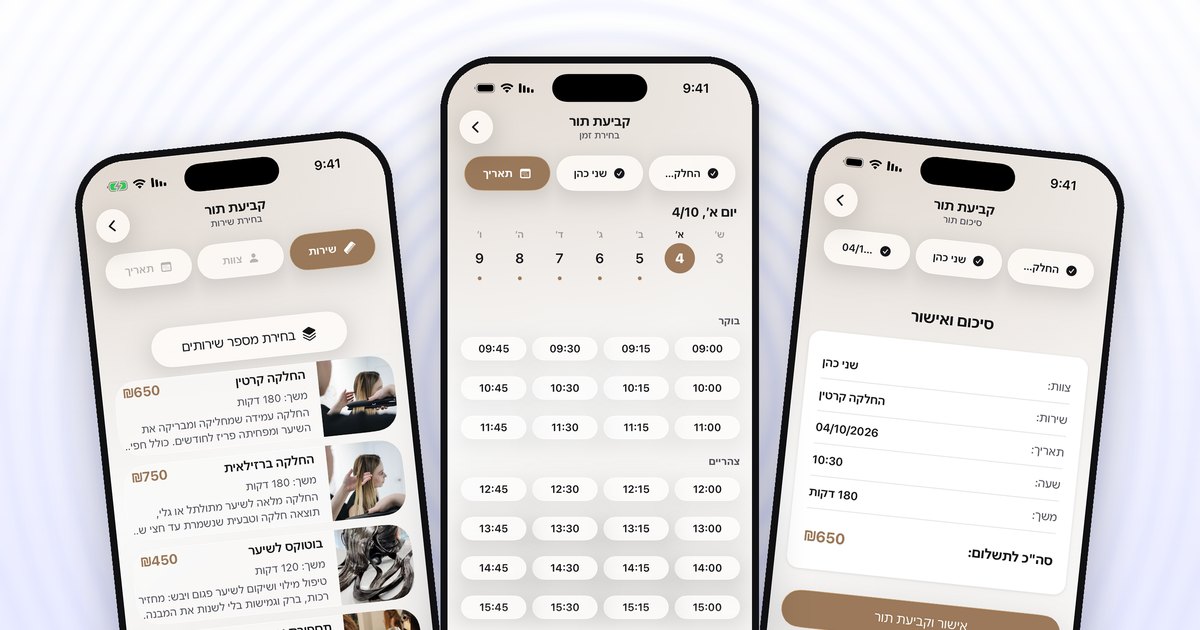
Many customers are loyal to a person, not only to a business. They want the barber who knows exactly how they like it, or the therapist who already knows them. When the customer chooses a service and a staff member, and then a date and a time, they see only the times that really suit them.
Keep the other side in mind too: a new customer who doesn't know the staff yet will want to see who is available. A business page with a work gallery and reviews helps them get to know the staff and choose. And if a certain day is full with their preferred staff member, a smart waitlist can offer them a slot that opens up.
Keeping the overall picture as the owner
The more staff members there are, the more it matters that the owner has the full picture: who works when, where it is busy and where there are open hours. A few habits that help:
- A regular weekly look at all the calendars together, to spot days that are too busy or too empty.
- Balance between staff members. If one is always full and another has openings, perhaps assign that person more services or feature them on your business page.
- One policy for everyone. Cancellation and attendance rules should apply to the whole staff in the same way. We wrote about this in the article on cancellation and no-show policies.
- Coordinating time off in advance, so that several staff members aren't missing at once in the same week.
The bottom line
Managing staff and shifts in an appointment-based business rests on a few simple foundations: a separate calendar for each staff member, a clear assignment of services, regular shifts that reflect reality, closures for time off and holidays, and a way for customers to choose their staff member. When all of these are set up properly, the calendar practically runs itself, and the owner can focus on the overall picture instead of on scheduling.
Want to bring the whole staff into one app, with a separate calendar and shifts for each person? You can download OverTor from the App Store or Google Play, open a business with a free trial and add your staff members today.